Back to work

Back to work

Case study · healthtech / design system

One Language. Every Screen. — How I Built StaffDNA’s Design System 2M Users

One Language. Every Screen. — How I Built StaffDNA's Design System 2M Users

Owned the design system from structure to implementation, improving consistency, scalability, and collaboration across design and development teams.

Company

StaffDNA

Role

UI-UX Designer

Year

2026

Platform

iOS · Android · Web

Timeline

12 weeks

Team

2 Designers

1 Designer · 2 Developers

· 1 PM

Domain

Healthtech

Tools

Figma

Overview

StaffDNA® connects over 2 million healthcare professionals to hospitals and staffing agencies across the United States — travel nurses, locum physicians, per diem specialists, and the recruiters who place them.


When I joined the product team, the app had grown organically across multiple product cycles. Different flows had different button styles, inconsistent form patterns, and duplicate components that made every release a coordination nightmare between design and engineering.

I was tasked with designing the foundational layer that would sit beneath everything — a living design system that could scale to new user roles, new platforms, and new product features without regression.


By the numbers:

  • 2M+ healthcare professionals across travel, local, per diem, and locum roles

  • 3 distinct user personas: Job seekers, travelers, and hospital recruiters

  • 5+ product surfaces: iOS app, Android app, Web app, admin portal, recruiter console

  • 1 goal: A unified component library — no more duplicates, no more ambiguity

StaffDNA® connects over 2 million healthcare professionals to hospitals and staffing agencies across the United States — travel nurses, locum physicians, per diem specialists, and the recruiters who place them.

When I joined the product team, the app had grown organically across multiple product cycles. Different flows had different button styles, inconsistent form patterns, and duplicate components that made every release a coordination nightmare between design and engineering.

I was tasked with designing the foundational layer that would sit beneath everything — a living design system that could scale to new user roles, new platforms, and new product features without regression.


By the numbers:

2M+ healthcare professionals across travel, local, per diem, and locum roles

3 distinct user personas: Job seekers, travelers, and hospital recruiters

5+ product surfaces: iOS app, Android app, Web app, admin portal, recruiter console

1 goal: A unified component library — no more duplicates, no more ambiguity

The problem

Before I could build anything, I needed to understand what was actually broken. I ran a two-week audit across all live product surfaces and documented every inconsistency. What I found fell into four clear categories.


  1. Inconsistent UI Patterns

The same action — like submitting a job application — had 4 different button styles across iOS, Android, and web. Modals, drawers, and sheets existed in overlapping, non-interchangeable forms. Every new feature reinvented the wheel.


  1. Slow Design-to-Dev Cycles

Engineers were spending approximately 35% of their sprint capacity re-interpreting specs and asking designers clarifying questions. Without a shared vocabulary, a 5-day feature often took 9 days to ship to production. Velocity was hemorrhaging through communication overhead.


  1. Poor Accessibility in Critical Flows

Healthcare professionals use the app in high-stress environments — on shift, at hospitals, at odd hours. Yet key flows like job search, credential upload, and pay calculator failed basic WCAG 2.1 AA contrast checks. Some critical action buttons had contrast ratios as low as 2.1:1.


  1. Fragmented Dual-Sided Experience

Job seekers and recruiters existed in separate product silos with no shared UI language. A recruiter messaging a candidate and a candidate responding saw completely different UI metaphors for the same conversation thread.


"We were shipping fast but breaking things constantly. Every sprint, I had to explain the same component decisions three different ways to three different engineers." — Design Audit Debrief, Sprint Retrospective

A Strong System Starts with Strong Foundation

A Strong System Starts with Strong Foundation

A Strong System Starts with Strong Foundation

  1. Color System

The palette was streamlined into a scalable system aligned with the brand. It now supports light and dark modes, bringing better consistency and ease across screens.

2. Typography

Typography was streamlined into a scalable type system with consistent roles and hierarchy. This improved readability, strengthened structure, and brought clarity across the

product.

3. Grid System

Quick Preview: The style guide is organized so it’s easy to use

Quick Preview: The style guide is organized so it’s easy to use

Quick Preview: The style guide is organized so it’s easy to use

Key findings:

Mobile First

78% of job seekers access StaffDNA on mobile devices, often between hospital shifts or in break rooms with limited time windows. This wasn't a "mobile-friendly" situation — it was mobile-native or nothing.

Advisors were asked for PAN, Aadhaar and bank proof before ever seeing a product they could earn from. Effort

came before value.

High Cognitive Load

Healthcare workers make credentialing and pay decisions under time pressure. Ambiguous UI caused abandonment at critical conversion points. Clarity wasn't a nice-to-have — it was a patient-care-adjacent requirement.

Once documents were submitted there was no visible status, no ETA and no notification — people assumed the app was broken.

Context Switching

Recruiters switch between candidate profiles, messaging, and job posting management dozens of times per session. Navigation patterns needed to be frictionless and predictable.

A single generic error covered file size, format and clarity issues, so users retried the same failing upload repeatedly.

Accessibility Gaps

My audit revealed 40% of color pairs in the existing product failed WCAG AA. Critical action buttons had contrast ratios as low as 2.1:1 — essentially invisible to users with low vision.

Payout rules and settlement timing appeared only after full registration, which made the whole effort feel speculative.

Core Interaction Components

Outcome

60%

Reduction in design-to-dev handoff time

40%

Fewer UI inconsistency bugs Tracked across three post-launch sprints

3x

Faster new designer onboarding From weeks to days

100%

100% — WCAG 2.1 AA compliance Across all core user flows

What’s Next

The next phase focuses on building a complete dark mode token layer for better accessibility during night-time use, followed by extending the system to support recruiter-side B2B patterns like data tables, Kanban views, and bulk actions. Finally, the goal is to automate the Figma Variables → Style Dictionary → CSS/JS pipeline, enabling faster and more consistent design-to-code updates.


I would instrument the funnel before redesigning rather than alongside it — early baselines would have made a few

debates about which stage to cut much shorter. I would also test document upload on low-end devices sooner; camera quality shaped more of the failure rate than the

interface did.

Takeaway

A design system is a product that needs users, stakeholders, and a clear roadmap. Tokens should be treated as intentional, reusable contracts, not just colours. Accessibility should be built into the design from the start, not added later. Clear documentation is essential for adoption, while an active design community helps the system stay useful, consistent, and scalable.


In regulated products you cannot remove the friction, only sequence and explain it. Ordering effort behind visible value, and making every wait state legible, did more for

conversion than any single screen redesign.

Key design decisions

01

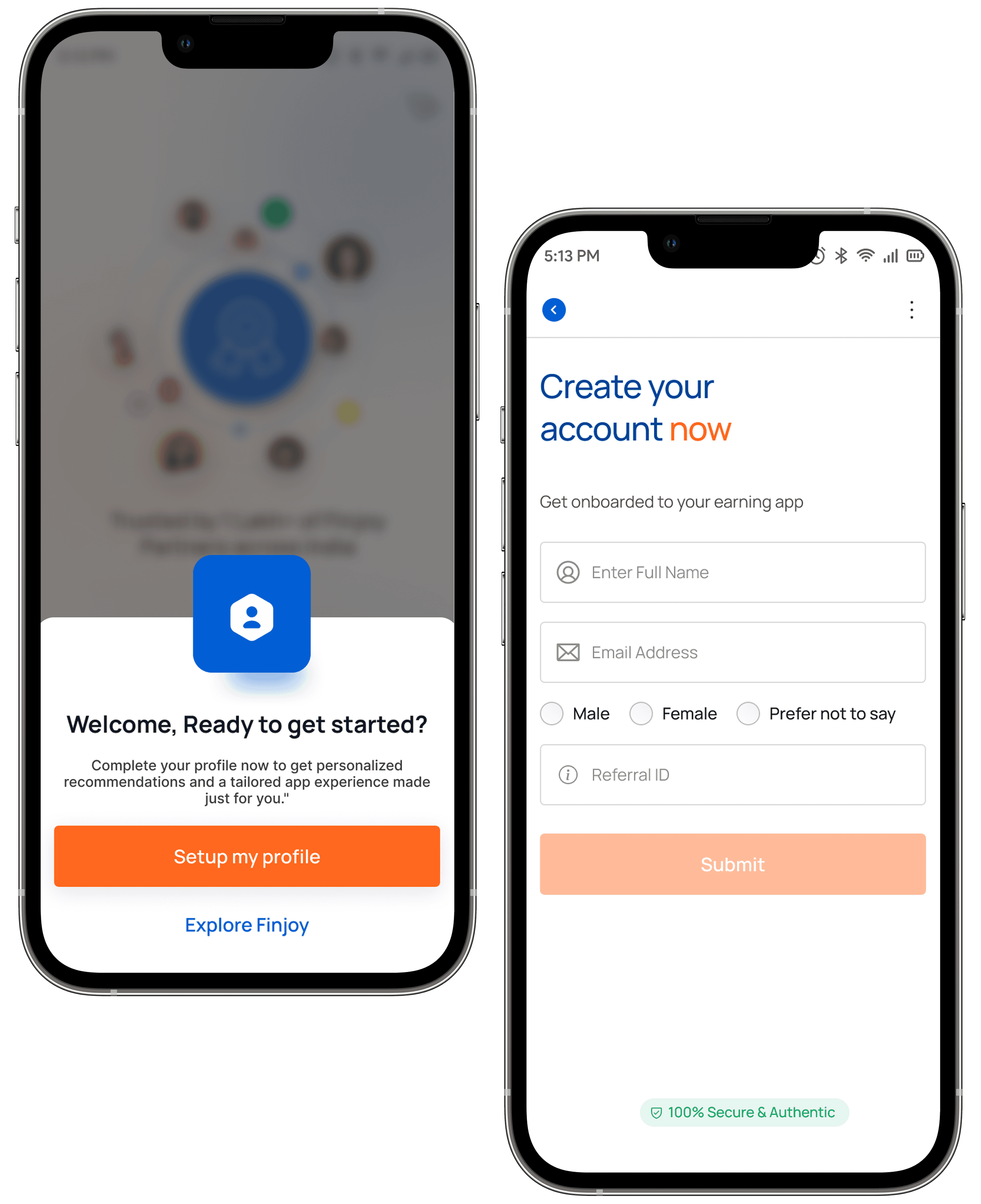
Splash Screens

The redesigned onboarding introduced:

  • Branded splash screen

  • Financial credibility indicators

  • Clear product positioning


Problem Identified
No brand introduction
Design Solution
Added branded splash & onboarding
UX Impact
introduction Improved first impression & trust

02

Walkthrough Screens

The onboarding now explains:

  • Earning opportunities

  • Referral workflows

  • Benefits of joining Finjoy


Problem Identified
Weak walkthrough screens
Design Solution
Introduced value-driven onboarding storytelling
UX Impact
Better product understanding

03

Landing Screen & Sign up

Instead of large forms, onboarding was redesigned into:

  • Smaller guided steps

  • Single-action screens

  • Clear progression states


Problem Identified
Direct signup friction
Design Solution
Added landing screen with Login / Signup / Social Login
UX Impact
Reduced entry friction

04

Complete Your Profile

The Small Change can lead to big win:

  • Explore Product

  • User first Approach


Problem Identified
Immediate registration pressure
Design Solution
Introduced product value communication before Completing the Profile setup
UX Impact
Increased motivation & Able to explore the product

05

Home/Dashboard Screen

The Home Page UI was redesigned using:

  • Cleaner layouts

  • Better spacing

  • Improved typography hierarchy

  • Modern fintech visuals

  • Simplified input interactions

  • Accessible mobile-first patterns


Problem Identified
Unstructured dashboard experience
Design Solution
Redesigned homepage with organized sections, earning visibility, product discovery, and guided actions
UX Impact
Improved engagement & faster product exploration

Contact

Have an idea worth building?

I'm open to product design roles, freelance engagements and

friendly conversations about UX, design systems and AI-driven

product work.

sureshseervi1392@gmail.com

© 2026 Suresh Seervi. Crafted with care.

Made in India · Available worldwide

Contact

Have an idea worth

building?

I'm open to product design roles, freelance

engagements and friendly conversations

about UX, design systems and AI-driven

product work.

sureshseervi1392@gmail.com

© 2026 Suresh Seervi. Crafted with care.

Made in India · Available worldwide

Create a free website with Framer, the website builder loved by startups, designers and agencies.